
OCTOBER 2026 • INDEPENDENT HOMEOWNER GUIDE
Heat Pump Energy Monitoring UK: Smart Meters, Apps and Home Assistant
From manufacturer apps and smart meters to Home Assistant and dedicated heat monitoring: understand what connects, what each reading means and which setup suits your home.
explained
without guesswork
UK guidance

QUICK ANSWER
What’s the Best Way to Monitor a Heat Pump?
Start with the information your installed system already provides. Use a manufacturer app for convenient status and controls; a dedicated electricity meter for more reliable heat-pump electricity use; and a properly specified heat meter alongside electrical measurements if you need to assess measured efficiency. Home Assistant can bring compatible data together, but it does not make poor source readings accurate.
Manufacturer app
Simple access to supported heating settings, schedules and system data — often partly estimated.
Dedicated electricity monitoring
Tracks the heat pump’s electrical consumption separately from the rest of the house when correctly installed.
Heat output monitoring
Requires appropriate heat/flow measurement if you want to assess actual heat delivered and measured COP.
Whole-home dashboard
Home Assistant and compatible smart-home tools can combine heating, solar, batteries and energy tariffs.
Our recommendation
For most homeowners, start with a clear manufacturer app and dependable electrical measurements. Add advanced monitoring when it answers a specific question. Avoid buying equipment purely to make dashboard graphs look impressive.
Heat Pump Monitoring Options at a Glance
| Monitoring method | What it tells you | Key limitation |
|---|---|---|
| Manufacturer phone app | Schedules, temperatures, system status, some energy information | Model-specific support; data may be calculated or estimated |
| Household smart meter | Grid electricity import and export | Does not isolate the heat pump from other household loads |
| Dedicated heat-pump electricity meter | Electrical energy used by monitored heat-pump circuits | Installation must include relevant immersion, backup or circulation loads where required |
| Heat meter plus electricity metering | Measured heat delivered compared with electricity input | Higher complexity; accuracy and boundaries of measurement matter |
| Home Assistant dashboard | Combines compatible device and sensor data | Limited by integration, calibration and source quality |
What Can a Heat Pump Connect To?
Smart-home compatibility depends on the exact indoor unit, controller and gateway — not simply the brand logo.
Manufacturer apps
Apps such as Daikin ONECTA, MELCloud Home, myVAILLANT and myUplink can provide remote access on supported systems. Compare what functions are included before purchasing.
Home Assistant
Supported integrations can connect heating data to a single dashboard. Different routes may use the manufacturer’s cloud, local interfaces or a third-party project. See our Heat Pumps and Home Assistant guide.
Alexa, Google Home and Apple Home
Some manufacturer controls offer selected voice or connected-home functions. Confirm compatible gateways, heating zones and actual controls rather than relying on promotional logos.
Tariffs, solar panels and batteries
A connected dashboard can show energy data from compatible meters and inverters. It does not guarantee that the heat pump itself can respond directly to a tariff signal.
Read our comparison of heat pump manufacturer apps for the practical differences between their phone interfaces.
Power, Energy and COP: Understand Your Dashboard
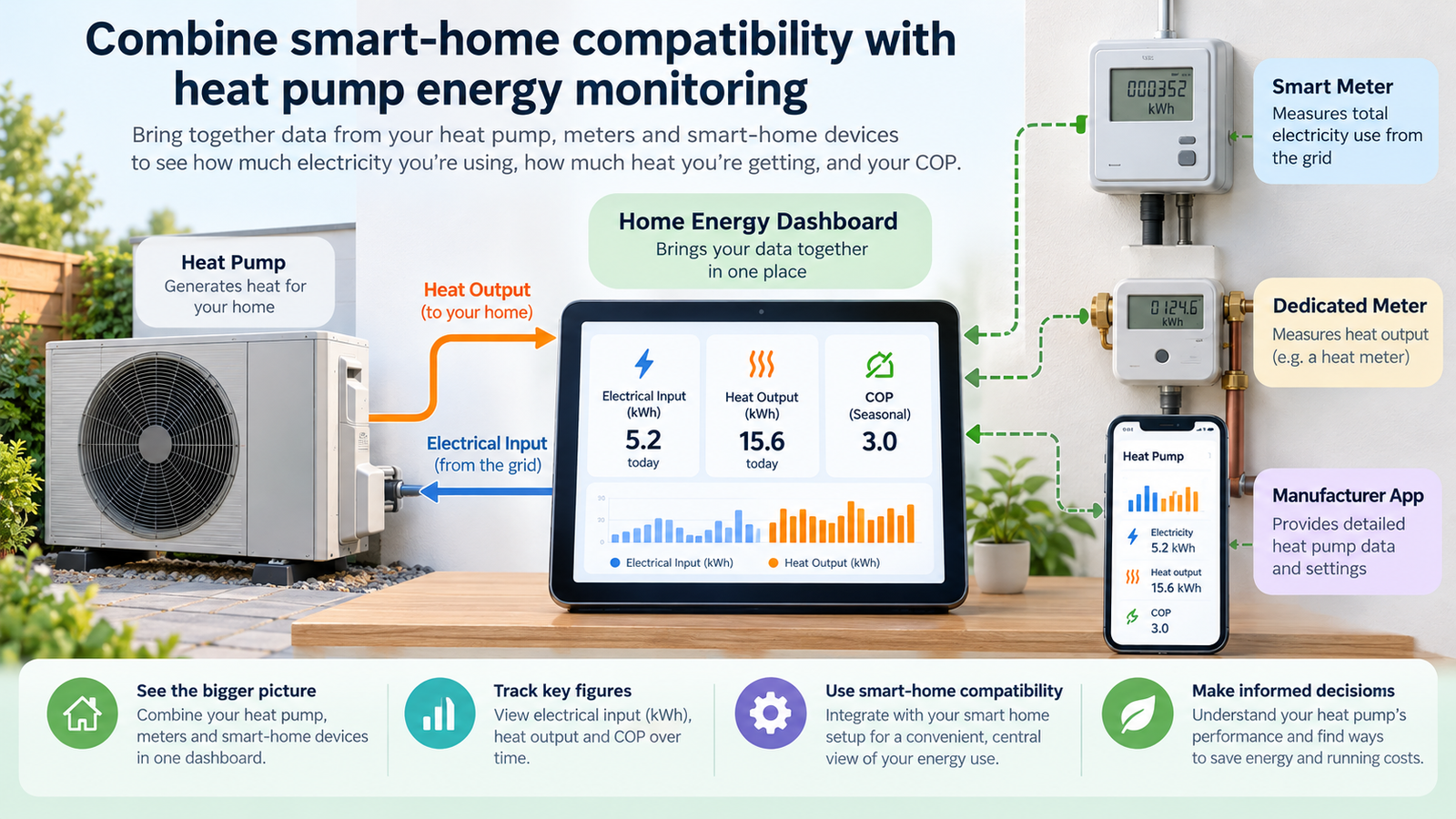
Illustrative connected-home graphic, not a verified measurement display.
kW — instantaneous power
How quickly energy is being transferred at a particular moment. A 2 kW electrical draw is not the same as 2 kWh of electricity used.
kWh — energy over time
Electricity consumed or heat delivered over an interval. Compare like-for-like reporting periods and check which electrical loads are included.
What does COP measure?
Coefficient of performance is the ratio of useful heat output to electrical energy input over a defined period. For example, 12 kWh of delivered heat divided by 4 kWh of measured electrical input gives an indicative COP of 3 for that period. This is a mathematical illustration, not a performance claim for any particular product.
For trustworthy measured performance, OpenEnergyMonitor recommends combining suitable electrical and heat-output measurements. See its heat pump monitoring guidance.
How to Build a Useful Home Energy Dashboard
- Decide what you want to know. Are you checking your electricity bill, daily usage, heating pattern or actual measured COP?
- Identify the available data. Review the manufacturer’s app and controller, and check which sensors your monitoring platform supports.
- Choose suitable measurements. Whole-home grid figures and heat-pump-only consumption answer different questions.
- Check sensor units. Home Assistant needs suitable energy entities and long-term statistics for its Energy dashboard; see official Energy dashboard guidance.
- Set realistic reporting boundaries. Decide whether immersion heaters, standby loads and external pumps belong in your electrical total.
- Watch trends before automating. Compare similar weather and usage periods instead of reacting to a single unusual reading.
- Ask a qualified electrician or heating professional to fit any electrical or heat metering that requires installation work.
What Level of Monitoring Makes Sense for Your Home?
Basic: convenient control
A manufacturer app and tariff bills may be enough if the system works comfortably and you simply want to adjust schedules or check operating status.
Intermediate: separate electricity readings
A properly installed heat-pump circuit meter can help identify consumption trends separately from cooking, lighting, car charging or other household loads.
Advanced: measured heat performance
Combine suitable electrical and heat measurements to assess performance over defined periods. Check calibration and all measurement boundaries.
Connected home: combined dashboards
Use Home Assistant or another supported platform to combine heat-pump energy data with solar, battery and tariff information. Avoid making the dashboard responsible for essential safety controls.
Monitoring alone cannot guarantee lower bills. Results depend on property heat loss, flow temperature, emitter sizing, controls, commissioning, installation, usage and electricity tariffs. For costs, see heat pump running costs in the UK.
Smart Home and Heat Pump Monitoring FAQs
Can a smart meter tell me how much my heat pump uses?
A household smart meter generally measures whole-property imports and exports, not the heat pump separately. A dedicated correctly fitted meter or suitable manufacturer data is needed for heat-pump-only electricity figures.
What is the difference between kW and kWh?
Kilowatts measure power at a moment in time. Kilowatt-hours measure energy used over a period. A heat pump drawing 2 kW for one hour uses approximately 2 kWh of electricity.
Can I calculate my heat pump’s COP from an app?
Only if you have suitable heat output and electrical input measurements covering the same period. Manufacturer estimates and dashboard calculations should not be mistaken for independently metered performance.
Will connecting a heat pump to Alexa or Google Home improve efficiency?
Not inherently. Voice control makes some tasks easier, but poorly configured temperature changes can conflict with weather compensation and increase cycling.
Is Home Assistant necessary to monitor a heat pump?
No. Manufacturer apps, dedicated electricity meters and independent heat pump monitoring systems may provide the information you need without Home Assistant.
OUR VERDICT
Measure What Matters, Then Add Automation
A compatible manufacturer app makes day-to-day control easier, while appropriate heat-pump electricity and heat-output monitoring can reveal more about actual operation. For technically confident homeowners, Home Assistant can combine data into a helpful overview. Start with reliable measurements, use automation conservatively and keep the heating system’s original controls in charge of safe operation.
Related Heat Pump Guides